Switching from Windows to Linux (3) - Testing
By Raymond Girbes -
Jul 2, 2025
- 8 minutes read
Data Storage Testing
Let's take a closer look at data storage. The focus is on practical aspects, such as opening and saving a text document, saving and opening a PDF, and saving, opening, and editing a spreadsheet. I will also copy files from the internal drive to the online drive using the same files.
First, let's run the upload test.
The Folder of Files
I used a folder named "Invoices" to ensure the screenshots could be used across different languages. These are actual invoices in PDF format, along with photos and calculation sheets created with LibreOffice and Microsoft Office. Altogether, the file is 378 MB, a pure practical test.
Internet Connection Speed
We have a stable fiber connection with approximately 85 Mbit/s download speed and 50 Mbit/s upload speed. The 50 Mbit/s upload speed is the crucial factor here.
In theory, a 50 Mbit/s connection can upload approximately 6.25 MB per second. Therefore, 378 MB ÷ 6.25 equals 60.48 seconds. In theory, you could upload a 6.25 MB file, such as a large photo, in one second.
Practical Insights
In practice, however, expect to use three to five times more bandwidth because you don't want to use all your bandwidth for a single upload. We need to browse and make calls, too.
If it finishes in 3 to 6 minutes, that's fine.
I'm eager to find out, aren't you?
First, let's run the upload test.
The Folder of Files
I used a folder named "Invoices" to ensure the screenshots could be used across different languages. These are actual invoices in PDF format, along with photos and calculation sheets created with LibreOffice and Microsoft Office. Altogether, the file is 378 MB, a pure practical test.
Internet Connection Speed
We have a stable fiber connection with approximately 85 Mbit/s download speed and 50 Mbit/s upload speed. The 50 Mbit/s upload speed is the crucial factor here.
In theory, a 50 Mbit/s connection can upload approximately 6.25 MB per second. Therefore, 378 MB ÷ 6.25 equals 60.48 seconds. In theory, you could upload a 6.25 MB file, such as a large photo, in one second.
Practical Insights
In practice, however, expect to use three to five times more bandwidth because you don't want to use all your bandwidth for a single upload. We need to browse and make calls, too.
If it finishes in 3 to 6 minutes, that's fine.
I'm eager to find out, aren't you?
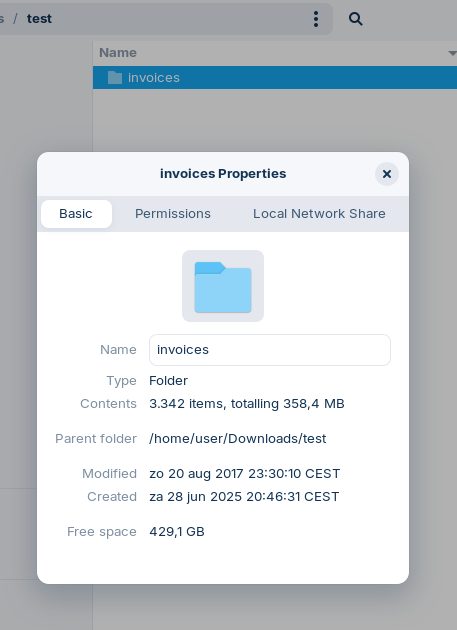
This is the 378 MB file being uploaded to the online disk. The folder contains 3,342 items.
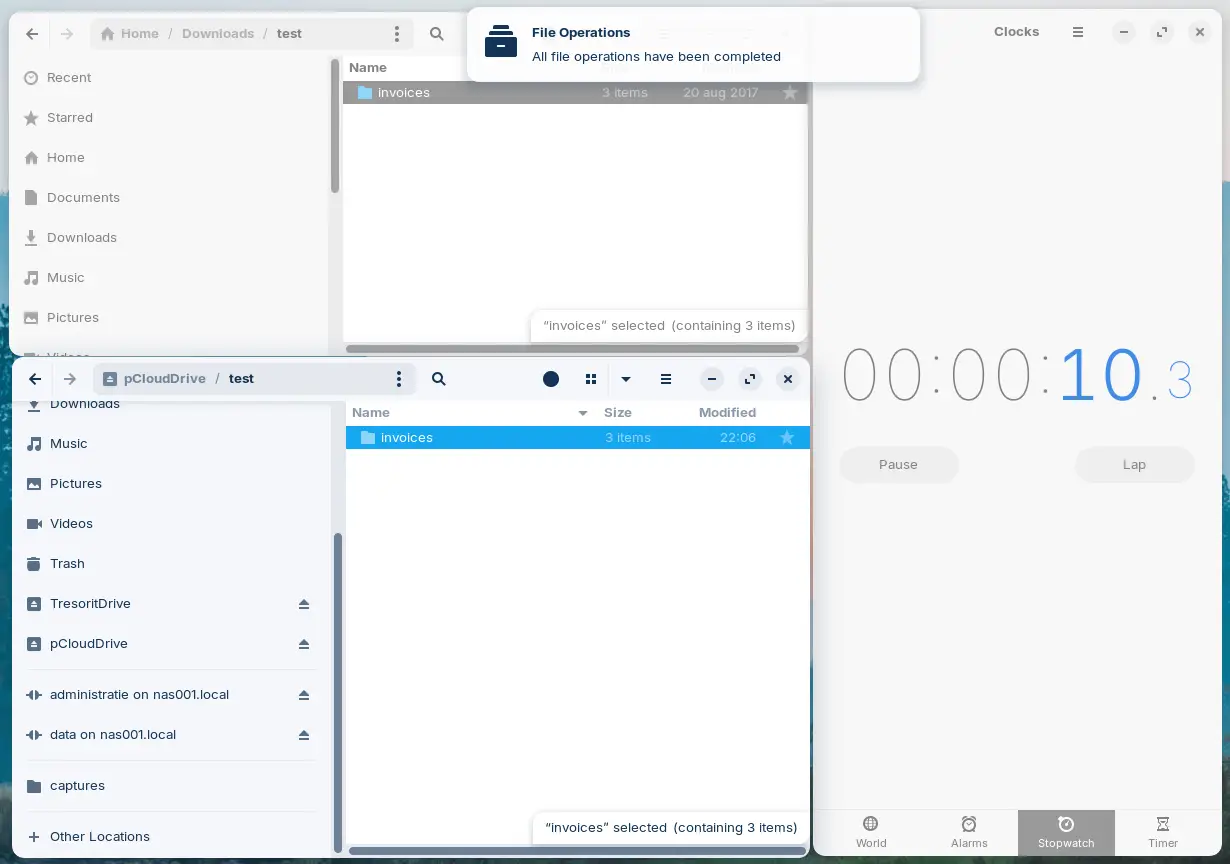
pCloud uses a cache system that makes it seem like files are uploaded to the drive in 11 seconds.
In reality, it takes more like 6.5 seconds, but I wasn't quick enough to capture a screenshot in Linux.
The actual transfer to the online disk happens later.
In reality, it takes more like 6.5 seconds, but I wasn't quick enough to capture a screenshot in Linux.
The actual transfer to the online disk happens later.
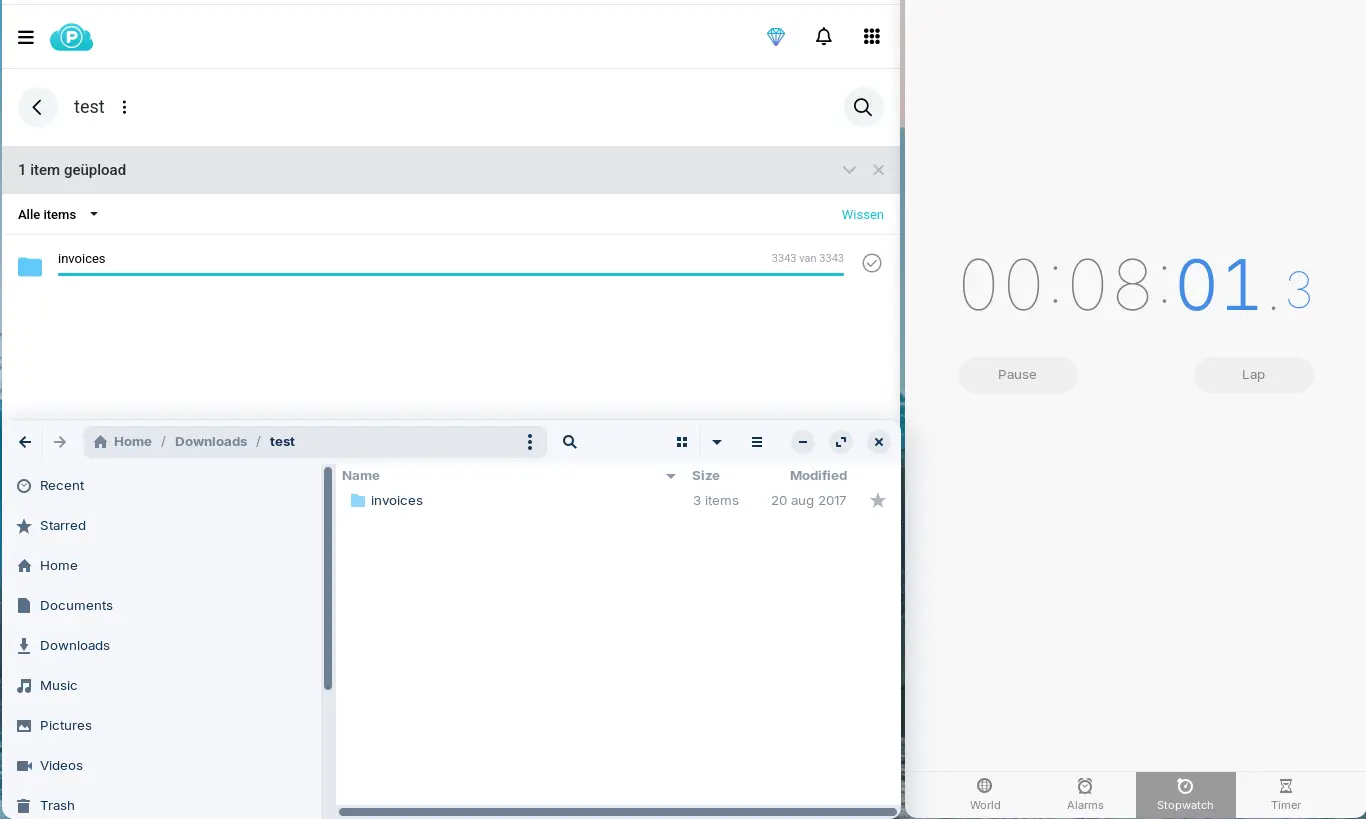
In reality, the upload occurs from the cache.
As shown here, the actual upload takes about 8 minutes.
That's a major difference from 6.5 seconds!
As shown here, the actual upload takes about 8 minutes.
That's a major difference from 6.5 seconds!
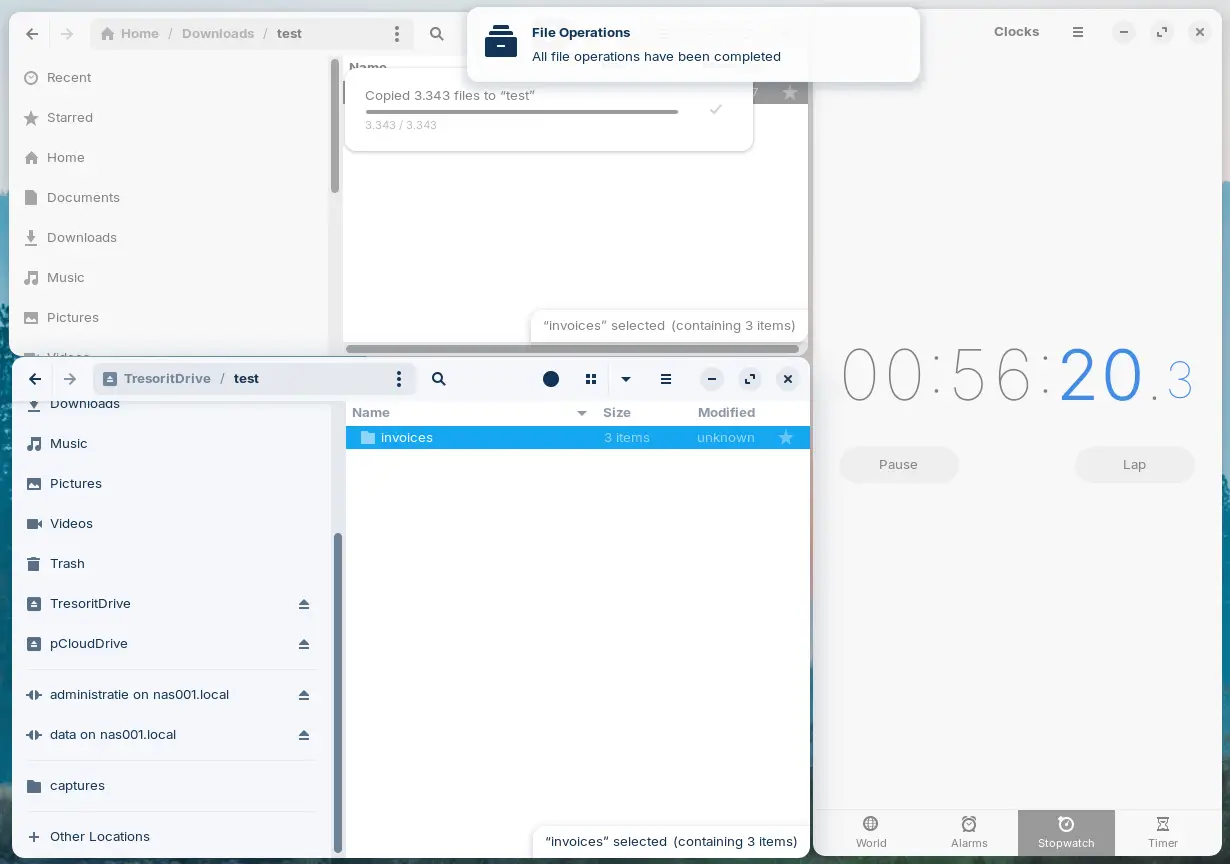
With Tresorit, uploading a 378 MB file to the online disk takes over 56 minutes.
Additional findings and responses from pCloud and Tresorit
Several interesting issues arose during the test. For instance, significant differences in upload speed were observed when transferring a folder containing files.
Both pCloud and Tresorit use a cache.
Examining pCloud's cache reveals that although the files have been given names and extensions, they are not secured. PDF files could be opened with a PDF reader. Further investigation revealed that Tresorit's files are also unsecured in the cache. That is exactly how it should be. The fact that these two products produced different outcomes made me question their actual security. I therefore asked both companies for clarification.
Response from pCloud
Once again, I received a quick response from pCloud, but it seemed like an AI-generated answer that failed to address my question.
However, my question was quite simple:
"Are cache files secured when I use the Crypto folder?"
They responded with a vague and incorrect answer, stating that cache files cannot be secured. This is nonsense, either written by an AI system or by someone who doesn't understand the subject. Alternatively, it could be a sales pitch. I can't think of any other reasons.
Since I am not satisfied with vague answers, I made it clear that the response was incorrect. At HRC DIGITAL, files are constantly being cached with and without security. This proves that files in a cache can be secured.
After my second response, it became clear that the subject was getting too technical for pCloud. They responded that they had forwarded the question to their development team and that I would receive an answer the following week, on July 3, 2025.
While it's good that they sent the question to their team, it's strange that a company that promotes security on its website doesn't know what happens to cache files.
This is a negative point for pCloud.
Response from Tresorit
At Tresorit, I received a quick response from their support department.
It soon became clear why uploading a folder of files took so long.
During the upload test, 3,343 files were uploaded.
Tresorit uploads and encrypts each file individually.
There's the answer!
They apologized for how long the upload took.
I replied that it's not a negative point if there's a good reason for it. If there's a good reason, then that's just the way it is.
As a user, you always have to consider the practicalities.
If you have a few open files and saving them is quick enough, then there's nothing wrong; you'll have a usable, secure product.
So far, this is a positive point for Tresorit.
pCloud Response
25 July 2025
After 22 days of waiting, pCloud has still not provided any answers to the security-related questions concerning the files.
Today, we asked whether they even intend to answer the questions at all.
The response from pCloud came two hours later, so very quickly!
------------------------- ------------------------------------------------
Dear Raymond,
We apologize for the late response.
When using pCloud Drive, two types of cache are created: upload cache and download cache.
If you have any further questions, please let us know.
Best regards,
Technical Support
pCloud
-------------------------------------------------------------------------
13-08-2025
I am still testing the Cloud drives and will give my final conclusion soon.
Both pCloud and Tresorit use a cache.
Examining pCloud's cache reveals that although the files have been given names and extensions, they are not secured. PDF files could be opened with a PDF reader. Further investigation revealed that Tresorit's files are also unsecured in the cache. That is exactly how it should be. The fact that these two products produced different outcomes made me question their actual security. I therefore asked both companies for clarification.
Response from pCloud
Once again, I received a quick response from pCloud, but it seemed like an AI-generated answer that failed to address my question.
However, my question was quite simple:
"Are cache files secured when I use the Crypto folder?"
They responded with a vague and incorrect answer, stating that cache files cannot be secured. This is nonsense, either written by an AI system or by someone who doesn't understand the subject. Alternatively, it could be a sales pitch. I can't think of any other reasons.
Since I am not satisfied with vague answers, I made it clear that the response was incorrect. At HRC DIGITAL, files are constantly being cached with and without security. This proves that files in a cache can be secured.
After my second response, it became clear that the subject was getting too technical for pCloud. They responded that they had forwarded the question to their development team and that I would receive an answer the following week, on July 3, 2025.
While it's good that they sent the question to their team, it's strange that a company that promotes security on its website doesn't know what happens to cache files.
This is a negative point for pCloud.
Response from Tresorit
At Tresorit, I received a quick response from their support department.
It soon became clear why uploading a folder of files took so long.
During the upload test, 3,343 files were uploaded.
Tresorit uploads and encrypts each file individually.
There's the answer!
They apologized for how long the upload took.
I replied that it's not a negative point if there's a good reason for it. If there's a good reason, then that's just the way it is.
As a user, you always have to consider the practicalities.
If you have a few open files and saving them is quick enough, then there's nothing wrong; you'll have a usable, secure product.
So far, this is a positive point for Tresorit.
pCloud Response
25 July 2025
After 22 days of waiting, pCloud has still not provided any answers to the security-related questions concerning the files.
Today, we asked whether they even intend to answer the questions at all.
The response from pCloud came two hours later, so very quickly!
------------------------- ------------------------------------------------
Dear Raymond,
We apologize for the late response.
When using pCloud Drive, two types of cache are created: upload cache and download cache.
- The upload cache is generated when you transfer files to pCloud Drive via drag & drop or copy & paste. The size of this cache corresponds to the size of the uploaded files. Please note that you cannot access files, both regular and Crypto files, via this cache.
- The download cache provides faster access to files and is created when you open a file from pCloud Drive. When opening files from the Crypto folder, an encrypted cache is created. These cache files are only accessible when the Crypto folder is unlocked.
If you have any further questions, please let us know.
Best regards,
Technical Support
pCloud
-------------------------------------------------------------------------
13-08-2025
I am still testing the Cloud drives and will give my final conclusion soon.
Final conclusions
17-01-2026
After months of testing, these are my conclusions.
pCloud
Technically, pCloud is a solid solution, and it’s even possible to start for free. In my opinion, the security is less strong than with Tresorit, because files are not end-to-end encrypted in all processes. In addition, the aggressive advertising campaigns bother me. In my view, they are a real intrusion on a workday. You cannot turn these ads on or off. My request to offer a cheaper business account with 1 TB and 2 users was not granted. I find that unfortunate, because it is a practical example of what many people need but are not being offered.
Conclusion: I do not recommend pCloud, unless you don’t find ads annoying and security is less important to you.
Tresorit
Technically, Tresorit is an impressive piece of engineering and very secure. As a result, in some situations it is slightly slower to use, although in practice you usually notice little of that.
There are no ad campaigns, you are left alone as a user. Tresorit also did not adjust its options to offer a cheaper account with 1 TB and 2 users. I find it striking that companies sometimes stick so firmly to their own ideas instead of taking a good look at market demand.
The trial account eventually becomes a free account that lets you keep using 3 GB on 2 devices.
Advice: use the free account.
Linux
After using Linux for months, my conclusion is that Linux is an excellent replacement for Windows. As with any operating system, there are advantages and disadvantages.
What are the biggest disadvantages?
What are the biggest advantages?
In short
If you want a reliable system and you take your own data and your customers’ data seriously, you can achieve that relatively easily by using Linux.
Final conclusion
If you cannot do without certain Windows programs, then on Linux you can choose a Windows compatibility layer or a virtual machine in which Windows actually runs. That way, you can keep using your Windows programs and do the rest of your work in Linux.
Future
I will continue using and expanding Linux, and I will also test another Linux distribution, because there are new positive developments.
After months of testing, these are my conclusions.
pCloud
Technically, pCloud is a solid solution, and it’s even possible to start for free. In my opinion, the security is less strong than with Tresorit, because files are not end-to-end encrypted in all processes. In addition, the aggressive advertising campaigns bother me. In my view, they are a real intrusion on a workday. You cannot turn these ads on or off. My request to offer a cheaper business account with 1 TB and 2 users was not granted. I find that unfortunate, because it is a practical example of what many people need but are not being offered.
Conclusion: I do not recommend pCloud, unless you don’t find ads annoying and security is less important to you.
Tresorit
Technically, Tresorit is an impressive piece of engineering and very secure. As a result, in some situations it is slightly slower to use, although in practice you usually notice little of that.
There are no ad campaigns, you are left alone as a user. Tresorit also did not adjust its options to offer a cheaper account with 1 TB and 2 users. I find it striking that companies sometimes stick so firmly to their own ideas instead of taking a good look at market demand.
The trial account eventually becomes a free account that lets you keep using 3 GB on 2 devices.
Advice: use the free account.
Linux
After using Linux for months, my conclusion is that Linux is an excellent replacement for Windows. As with any operating system, there are advantages and disadvantages.
What are the biggest disadvantages?
- If you want to use your own network storage (your own NAS), it’s wise to outsource this to someone with experience. Or you can follow a guide that will soon be available on this Xootle blog.
- If you don’t want a network drive, you can use many free solutions to synchronize your files with your other computers.
- Not everything looks equally modern, but it is robust.
- Installing most printers is not a problem at all. Older or specialized printers sometimes don’t have Linux drivers.
- Some programs are only available for Windows. You can sometimes run those via a Windows compatibility layer (such as Wine) or via a virtual machine running Windows.
What are the biggest advantages?
- Free, or for a small (voluntary) contribution
- Extremely fast
- Extremely stable
- A lot of privacy
- A wide choice of open source software
- Excellent to use on older computers
- Updates are not forced, you decide yourself
- No spyware and no meddling from Microsoft
- Office software that works easily, such as LibreOffice or OnlyOffice
- Lots of choice in video software
- Lots of choice in photo editing software
- Email programs such as Thunderbird
In short
If you want a reliable system and you take your own data and your customers’ data seriously, you can achieve that relatively easily by using Linux.
Final conclusion
If you cannot do without certain Windows programs, then on Linux you can choose a Windows compatibility layer or a virtual machine in which Windows actually runs. That way, you can keep using your Windows programs and do the rest of your work in Linux.
Future
I will continue using and expanding Linux, and I will also test another Linux distribution, because there are new positive developments.